Servers and tools
Each MCP server is a group of tools on its own port. Every tool is a ServiceNow API with a name, description and parameters, which is what the model sees.
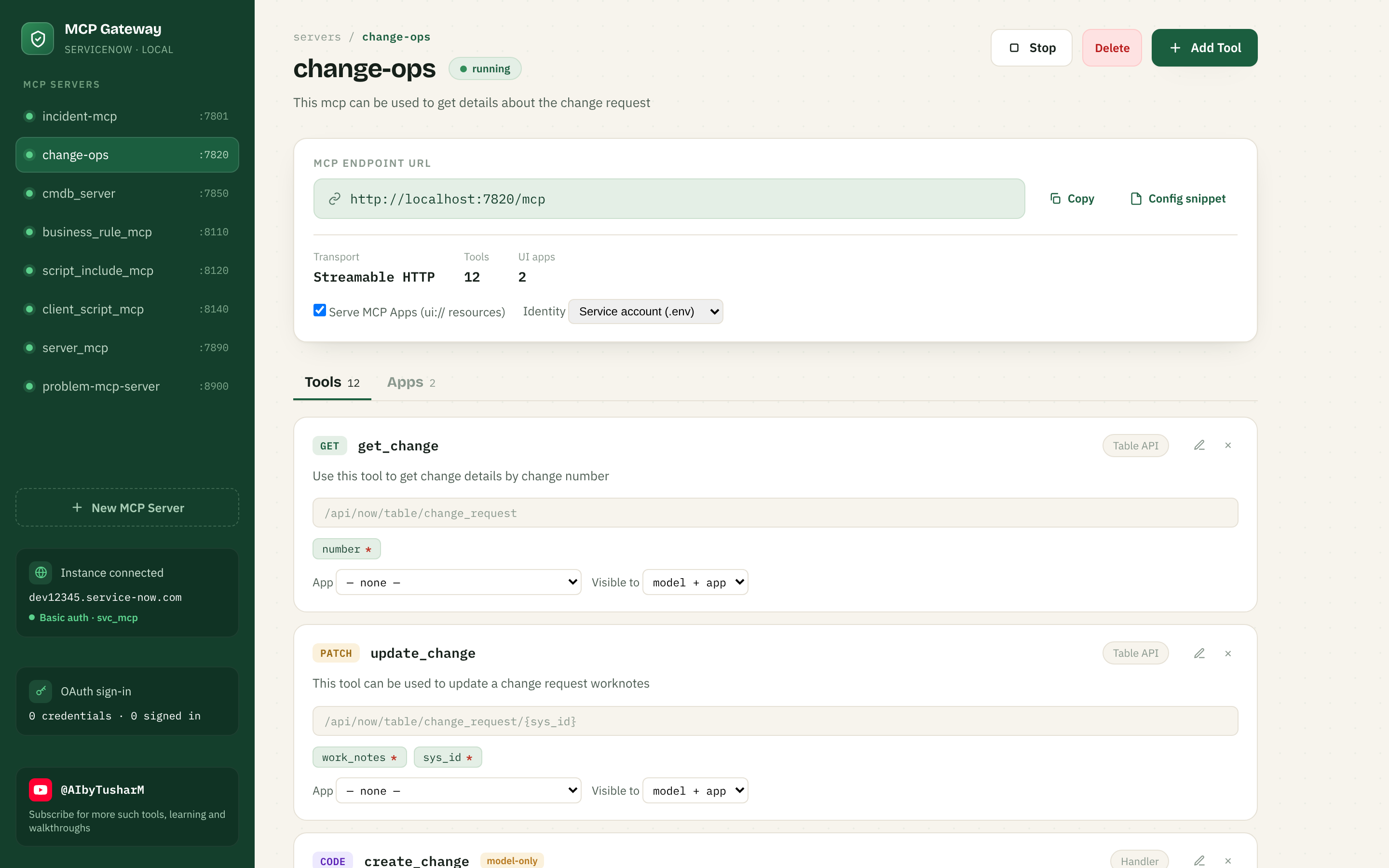
- 1One server per jobIncidents, changes, CMDB, business rules, script includes, client scripts, problems. All start automatically, each on its own port.
- 2Endpoint and configCopy the MCP URL, or open Config snippet for ready-to-paste client config.
- 3Who ServiceNow seesRun tools as a service account, or have each user sign in with OAuth. Toggle MCP Apps (interactive UIs) per server.
- 4ToolsWrap the Table API, a Scripted REST endpoint or a built-in code handler. Edit and Claude sees the change on its next call.
- 5Add your ownNew tools and new servers in a couple of clicks. Writes are rate-limited and audit-logged.
- 6Instance & OAuthConnect your instance and manage OAuth sign-in from the sidebar.
Apps inside the chat
MCP Apps show a real form, table or approval card in Claude instead of plain text. Build one without code, or attach your own HTML.
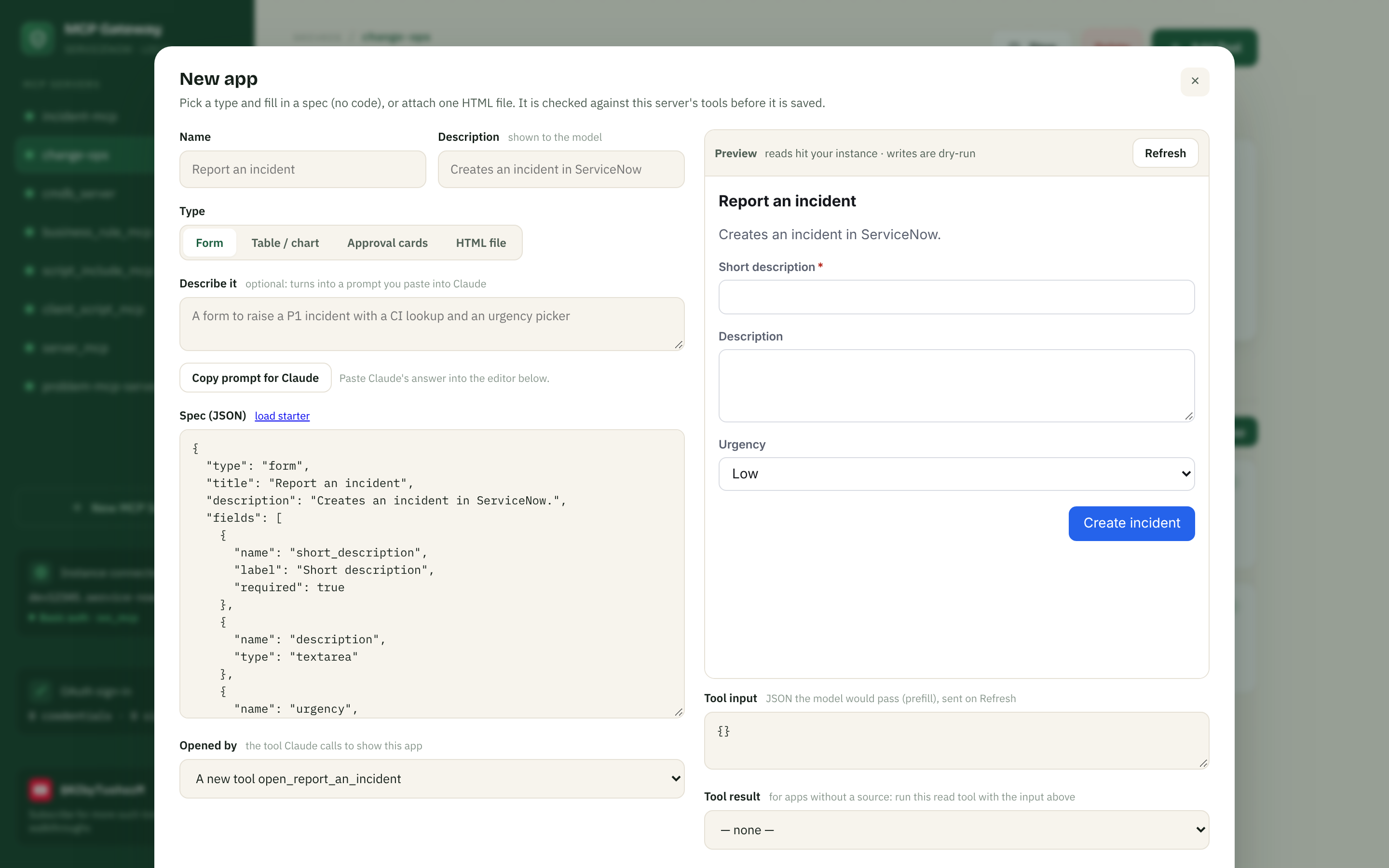
- 1Pick a typeForm, table / chart, approval cards, or your own HTML file.
- 2Describe itWrite what you want and copy a ready prompt for Claude. It writes the spec for you.
- 3Spec, not codeA short JSON spec, checked against this server's tools before it saves.
- 4Live previewReads hit your instance, writes are a dry run, so you can test safely.
- 5Opened by a toolClaude calls this tool to show the app. Change forms and approval inboxes ship built in.
Connect a client
Every server gives you copy-paste config for Claude Desktop and Claude Code. Any other MCP client just needs the URL.
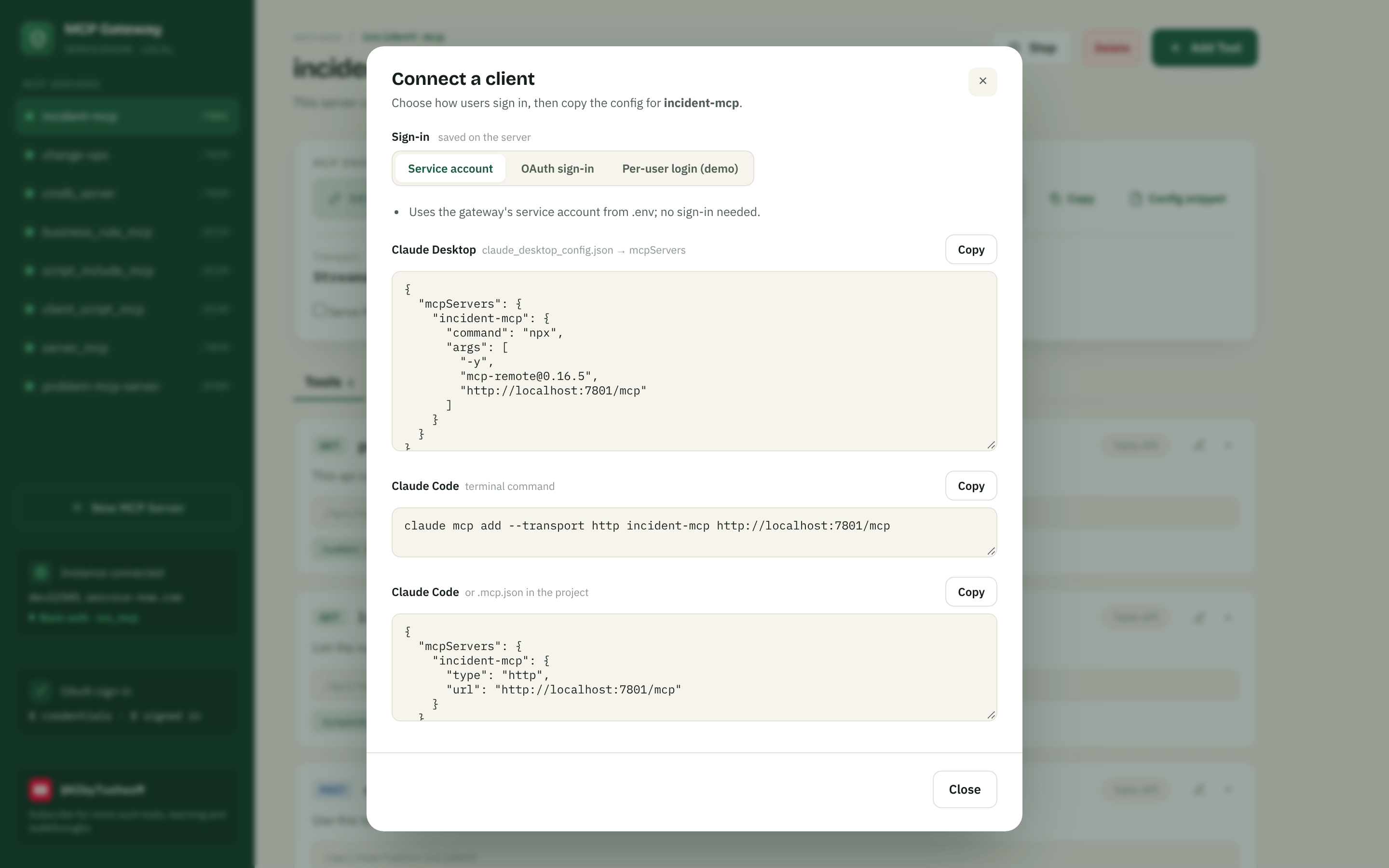
- 1Choose sign-inService account (simplest), OAuth sign-in through the browser, or per-user login for demos.
- 2Claude DesktopPaste into
claude_desktop_config.json. It bridges throughmcp-remote. - 3Claude CodeOne
claude mcp addcommand… - 4…or a project fileCommit
.mcp.jsonso the whole team gets the server.
Get started
Pick whichever fits. Or hand the agent skill to Claude and let it do the setup.
Run with npx
Nothing to install. Pass your instance in env vars, or enter it later in the UI.
SN_INSTANCE_URL=https://devXXXXX.service-now.com \
SN_USERNAME=... SN_PASSWORD=... \
npx servicenow-mcp-gateway
Install globally
Keep a .env in ~/.servicenow-mcp-gateway and run it any time.
npm install -g servicenow-mcp-gateway
servicenow-mcp-gateway
From source
To change the code or contribute.
git clone https://github.com/yvain13/Servicenow-mcp-gateway.git
cd Servicenow-mcp-gateway
npm install && npm run dev
Let your agent set it up
Give this skill to Claude Code (or any coding agent). It installs and starts the gateway, connects your instance, registers the MCP servers with your client, and hands you back their names and URLs.
- Install the skill. For Claude Code, save it as a personal skill:
mkdir -p ~/.claude/skills/servicenow-mcp-gateway && curl -fsSL https://yvain13.github.io/Servicenow-mcp-gateway/SKILL.md -o ~/.claude/skills/servicenow-mcp-gateway/SKILL.md
- Or just paste it. Copy the file on the right and paste it into any agent's chat.
- Ask. “Set up the ServiceNow MCP gateway for my instance.”
- Answer one question. The agent asks for your instance URL and login, then does the rest.
- Done. You get the UI link and a table of MCP servers, already added to Claude.
Loading SKILL.md…